
 English
Interactive Displays for Lecture Halls: A Buyer's Guide
Buying an interactive display for a lecture hall is not the same as buying one for a classroom. A classroom screen serves twenty or thirty students within a few meters. A lecture hall has to carry a professor's notes to the back row of a room that runs fifteen meters deep, often with two hundred students in it. The screen that works brilliantly in one will be unreadable in the other, and that is the mistake most buyers only discover after the install.
This guide covers what changes when the room gets bigger — size, brightness, viewing angle, resolution, and the system that drives the whole thing.
Why a Lecture Hall Needs a Different Display
The defining difference is distance. In a small classroom the screen is a focal point; in a lecture hall it is the only thing half the room can see. That single fact changes every spec that matters. Text that is crisp at three meters is unreadable at twelve. A 350 cd/m² panel that holds up fine in a dim classroom washes out under the ambient light of a tiered auditorium with windows down one side. Buy for the room, not for the brochure.
The same logic applies to the technology choice. A projector that filled the same wall a decade ago now competes against flat panels that stay sharp in daylight and never need a bulb replaced — which matters when the room is booked six periods a day.
What Size Fits Your Lecture Hall
Size is the first decision and the one buyers most often get wrong by going too small. As a working rule, an 86-inch panel carries a hall of roughly 50 to 80 seats. A 98-inch panel stretches comfortably to about 120. For a large auditorium of 150 seats or more, you want a 105-inch or 110-inch panel so the back row is not squinting at slide bullet points.
If you are weighing whether a 100-inch class display is the right call for your space, it is worth walking through the size logic before you commit. The instinct to save money on a smaller screen almost always costs more in the long run, because a screen nobody in the back can read is a screen that does not get used.
Specs That Matter in a Big Room
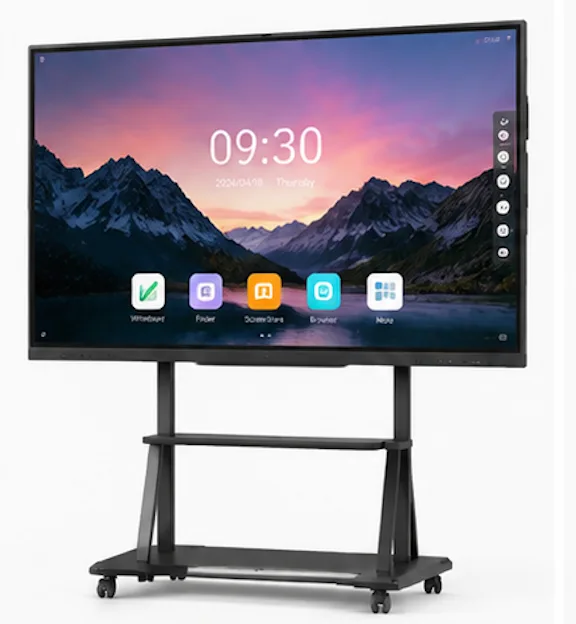
Four specs do the heavy lifting in a large space. Resolution first: 4K UHD is not a luxury in a lecture hall, it is the floor — at these sizes, 1080p visibly falls apart. Brightness second: 350 cd/m² is the practical minimum, and you want an anti-glare surface so window light and overhead spots do not turn the screen into a mirror. Viewing angle third: a 178° panel means the students on the far left and right see the same image as the center, which a cheap panel will not give you.
Touch is the fourth, and it works differently here than in a classroom. A lecturer presenting to two hundred people is not doing multi-student whiteboarding — they are annotating slides, so infrared 40-point touch gives the responsiveness they need without paying for capabilities the room will not use. The resolution question deserves its own look before you finalize, because it is where lecture-hall buyers either future-proof or under-buy.
System, Software and Setup
The panel is half the install. The other half is the system behind it. Look for Android built in for a smooth out-of-the-box experience, plus an OPS slot so the IT department can drop in a Windows 11 Pro module when they need full desktop software — lecture capture, video conferencing, or a specific learning platform. Wireless screen sharing matters more than it seems, because a rotating cast of lecturers will each bring a different laptop and expect to present without hunting for cables.
Plan the setup around the people, not the gear. A wall-mounted panel at the right height for the front row to read, a mobile stand if the hall gets repurposed, and enough ports accessible so guest speakers are not kneeling behind the panel mid-talk.
Buying Large Panels Factory-Direct
The reason size keeps coming up is that not every factory builds large panels well. Lonton has manufactured displays since 2005, and our range runs from 65" all the way to 110" — which matters, because a supplier that tops out at 86" will quietly steer you toward a screen that is too small for your hall. We build on genuine LG LCD panels with 4K resolution, 350 cd/m² brightness, a 178° viewing angle, and anti-glare tempered glass, and we supply education buyers from primary schools through universities.
For the broader picture of what a school deployment needs, our guide to interactive displays for education covers the requirements end to end. And if your hall is currently running a projector, the honest flat panel vs projector comparison will tell you whether the switch is worth it in your case.
Plan Your Lecture Hall Display
Tell us the seat count and the depth of your hall, and we will recommend the right size from our 86" to 110" range, then quote it factory-direct with real lead times. Whether you are outfitting one auditorium or a whole campus, the spec should be matched to the room, not the other way around.
Start with our interactive flat panel range, or contact us with your lecture hall dimensions today.
Frequently Asked Questions
What size interactive display do I need for a lecture hall?
As a rule of thumb, 86" for 50–80 seats, 98" for up to about 120, and 105" or 110" for large auditoriums of 150 seats or more. The exact size depends on the room's depth and the distance to the back row.
Is 4K really necessary in a lecture hall?
Yes. At 86" and above, 1080p visibly softens text, and the back row is already the hardest seat in the room to serve. 4K UHD keeps slides and annotations crisp at distance.
Do lecture halls need a different brightness than classrooms?
Often, yes. Lecture halls tend to be larger with more ambient light, so 350 cd/m² with an anti-glare surface is the practical floor for a room that stays readable all day.
Can a lecture hall display run Windows software?
Yes. Look for a panel with an OPS slot so IT can add a Windows 11 Pro module for lecture capture, conferencing, or a specific learning platform alongside the built-in Android system.
What sizes does Lonton build?
65", 75", 86", 98", 105" and 110 inches, all on genuine LG LCD panels. If your campus has halls of different sizes, we can mix sizes in a single order.

