
 English
You are pricing out a meeting room upgrade. Somewhere between the first Google search and the purchase order, a question starts nagging: how much does this actually cost, all in?
The sticker price of an interactive flat panel is easy to find. What is harder is the real total — mounting hardware, installation labor, cables, configuration, training, and the stuff you only discover when the box arrives and someone realizes the wall is not strong enough. This guide breaks down every line item so your budget does not surprise you later.
The Board Itself: Where Your Money Goes
The interactive flat panel is the biggest single line item, and pricing breaks into three rough tiers based on brand, quality, and what comes in the box.
A 65-inch board in the entry tier — typically a lesser-known brand with basic IR touch, 350-nit brightness, and a 1-year warranty — lands between $900 and $1,400. These boards work, but they cut corners. The speakers are weak. The anti-glare coating is minimal. The warranty is short. If your meeting room gets used twice a week, you will probably be fine. If it gets used eight hours a day, the corners you save money on will eventually find you.
The mid-range tier — and the answer to how much does a smart board cost for most meeting rooms — lands between $1,500 and $2,500 for a 65-inch. You get 400-nit brightness, 20-plus-point IR touch, built-in Android with wireless casting, and a reasonable warranty. As a professional manufacturer, LonTon positions its interactive flat panels in this tier, with flexible warranty terms tailored to your deployment size. The boards ship with anti-glare tempered glass, dual-band WiFi, and an OPS slot ready for future upgrades — no need to buy a separate PC on day one.
The premium tier — $2,500 to $4,000 for a 65-inch — adds capacitive touch, built-in 4K cameras with speaker tracking, higher-end audio, and a slicker industrial design. These boards belong in executive boardrooms where aesthetics and polish justify the premium. For a standard meeting room that runs Zoom calls and whiteboarding sessions, the mid-range tier delivers everything you need without the logo tax.
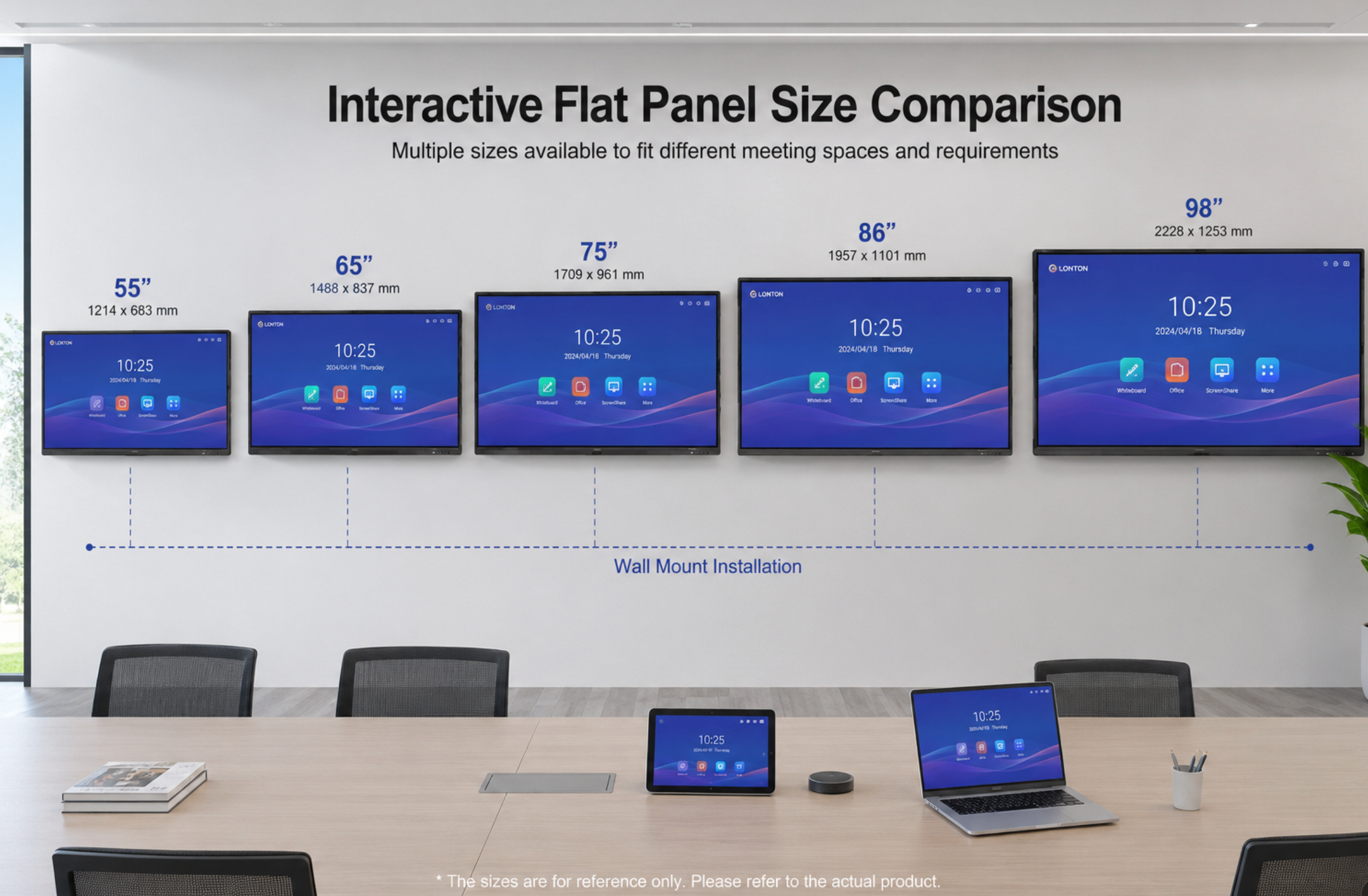
Larger sizes scale predictably. A 75-inch board adds roughly 20 to 30 percent over the 65-inch price in the same tier. An 86-inch board adds 40 to 50 percent. A 98-inch board roughly doubles it. The jump from 86 to 98 is steep because the panel cost increases non-linearly at those sizes — factories produce far fewer 98-inch units, which raises per-unit cost across the supply chain.

Installation: What the Price Tag Does Not Tell You
The board price covers the hardware. It does not cover putting it on your wall, and installation costs vary wildly depending on your room.
Mounting hardware — a fixed wall bracket — runs $80 to $200. A mobile floor stand with height adjustment runs $250 to $600. Ceiling mounts exist but are rare for interactive flat panels and generally not recommended because the touch experience suffers at odd angles. If you want the board height-adjustable on the wall, expect to add $150 to $300 for a lift mechanism.
Professional installation — having someone mount the board, run cables through the wall, and test everything — typically costs $400 to $1,200 depending on wall type and complexity. A drywall installation with cable concealment in a standard meeting room is on the lower end. A concrete wall in a historic building with no existing power outlet near the mounting point is on the higher end. If your installer charges less than $300, ask what they are not including.
The electrical requirement is one 110-240V outlet near the mounting point. Most meeting rooms already have this. If yours does not, running a new outlet adds $200 to $500.
The Hidden Costs Nobody Mentions
Cables are the first surprise. A good HDMI 2.1 cable long enough to reach from the board to the conference table costs $25 to $60. USB-C cables for laptop charging and video passthrough cost similar amounts. If you want everything concealed in the wall, add cable management raceways or in-wall conduit at $50 to $150.
A separate PC is sometimes necessary. The built-in Android system handles whiteboarding, wireless casting, and basic video calls — and for many meeting rooms, that is enough. But if your team needs full Windows applications or runs software that Android does not support, you will need an OPS module or an external mini PC. An OPS module from a reputable manufacturer runs $300 to $600. An external mini PC with mounting hardware runs $300 to $800. A LonTon board includes an OPS slot so you can add Windows later — you do not need it on day one, but the slot being there means you do not have to replace the whole board when your needs change.
Peripheral devices add up fast. A good conference speakerphone — if the built-in speakers and microphone array are not sufficient — runs $150 to $500. An external 4K webcam for rooms where the camera angle from the board is awkward runs $100 to $300. These are optional, and on a well-designed board with built-in camera and microphone array, they are often unnecessary.
Software licensing is the cost people forget until the invoice arrives. Wireless screen sharing on most interactive flat panels requires software activation — and that activation generally involves a license fee. On LonTon boards, your account manager will detail this based on your deployment size. Video conferencing platform licenses — Zoom Rooms, Microsoft Teams Rooms — are separate and recurring. A Zoom Rooms license runs $499 per year per room. If you are outfitting five meeting rooms, that is $2,500 annually that needs a line in the ongoing budget.

Total Cost: Three Real Scenarios
To put real numbers on this, here is what three common meeting room setups actually cost.
Basic meeting room — 65-inch mid-range board, wall-mounted, Android-only
A 65-inch LonTon interactive flat panel runs $1,500 to $1,800, a fixed wall bracket adds about $100, professional installation on drywall with concealed cables is roughly $500, and HDMI plus USB-C cables come to $80. Wireless screen sharing activation is priced per deployment — your account manager will give you the exact number. Estimated total: $2,200 to $2,500. This room is ready for whiteboarding, wireless casting, and basic video calls. No PC, no external peripherals, one power outlet. A team walks in, turns it on, and starts working.
Standard meeting room — 75-inch mid-range board, wall-mounted, with Windows OPS
A 75-inch LonTon board at $2,000 to $2,400, a fixed wall bracket at $120, an OPS module for Windows at $450, professional installation at $600, and cables at $100. Screen sharing activation is per deployment. Estimated total: $3,300 to $3,700. This room runs full Windows applications alongside Android, handles hybrid meetings with screen sharing and annotation, and covers everything a standard corporate meeting room needs.
Executive boardroom — 86-inch premium board, mobile stand, full audio-visual
An 86-inch premium interactive flat panel at $3,500 to $4,500, a mobile floor stand with height adjustment at $500, an external conference speakerphone at $350, professional installation at $800, cables at $120, screen sharing activation per deployment, and a Zoom Rooms license at $499 per year. Estimated first-year total: $5,800 to $6,800. This room is the flagship — it handles large hybrid meetings, impresses visiting clients, and justifies its cost through the demand it generates.
Where You Can Save — and Where You Should Not
Skip the external PC on day one. The built-in Android system handles most meeting room needs, and if you discover later that you need Windows, the OPS slot makes it a five-minute upgrade rather than a full replacement.
Do not skip the professional installation. A poorly mounted board is a liability — it can fall, it can have touch calibration drift from uneven mounting, and it will look unprofessional with cables dangling below it. The $500 to $800 for a good installer is cheaper than the cost of someone getting hurt or a board that never quite works right.
Do not buy the cheapest board you can find. The difference between a $1,000 entry-level board and a $1,600 mid-range board is not just the brand — it is the anti-glare coating quality, the touch frame durability, the speaker performance, and the warranty coverage. A board that gets replaced in two years costs more than the one that lasts five.
If you are planning meeting room upgrades and want a clear smart board cost breakdown for your specific rooms, LonTon can walk you through the numbers. Tell us how many rooms, what size, and what you need them to do. We will give you a line-by-line estimate so your budget meeting goes smoother than your last one.

